
Xtuis
Scan this QR code with WeChat
Inside WeChat, use the ··· menu at the top right: Send to Chat / Share to Moments
Xtuis
XTUIS.CN
A WeChat push API for scripts, servers and AI agents. Follow our WeChat Official Account to get a token, send one HTTP request, and the message is on your phone.

I trade futures with a program and want a summary of every fill sent to me the moment it happens.
I want an instant alert when a server goes down, so I can deal with it right away.
My script watches for a product to be restocked and tells me as soon as it is back.
While my game script runs unattended, it reports its levelling progress every so often.
I hand a task to an AI agent and it pings me through Xtuis when it is done, so I don't have to keep watching.
The agent pushes a summary of its results to my phone, so I see them even when I'm out.
For AI agents, the Agent Xtuis CLI lets Claude Code, Codex and others push with one plain-language request, without your token ever appearing in the chat.

https://wx.xtuis.cn/ABCDEFG.send?text=Gold is up&desp=Gold rose 100 today
Paste it into your browser's address bar, replace ABCDEFG with your token and press Enter. The notification arrives in WeChat.
Every example below makes the same GET request, with the parameters URL-encoded onto the URL. Replace YOUR_TOKEN with your own token.
Non-ASCII text such as Chinese must be URL-encoded; MetaTrader (MQL5) WebRequest rejects a URL with raw Chinese characters with HTTP 400.
curl -G 'https://wx.xtuis.cn/YOUR_TOKEN.send' \
  --data-urlencode 'text=Gold is up' \
  --data-urlencode 'desp=Gold rose 100 today'
import requests
params = {
"text": "Gold is up",
"desp": "Gold rose 100 today",
}
response = requests.get(
"https://wx.xtuis.cn/YOUR_TOKEN.send",
params=params,
timeout=10,
)
print(response.text)const params = new URLSearchParams({
text: "Gold is up",
desp: "Gold rose 100 today",
});
fetch(`https://wx.xtuis.cn/YOUR_TOKEN.send?${params.toString()}`)
.then((res) => res.text())
.then((text) => console.log(text));const axios = require("axios");
axios
.get("https://wx.xtuis.cn/YOUR_TOKEN.send", {
params: {
text: "Gold is up",
desp: "Gold rose 100 today",
},
timeout: 10000,
})
.then(({ data }) => console.log(data))
.catch((err) => console.error(err.message));package main
import (
"fmt"
"io"
"net/http"
"net/url"
)
func main() {
params := url.Values{}
params.Set("text", "Gold is up")
params.Set("desp", "Gold rose 100 today")
endpoint := "https://wx.xtuis.cn/YOUR_TOKEN.send?" + params.Encode()
resp, err := http.Get(endpoint)
if err != nil {
panic(err)
}
defer resp.Body.Close()
body, _ := io.ReadAll(resp.Body)
fmt.Println(string(body))
}<?php
$query = http_build_query([
'text' => 'Gold is up',
'desp' => 'Gold rose 100 today',
]);
$url = 'https://wx.xtuis.cn/YOUR_TOKEN.send?' . $query;
$result = file_get_contents($url);
echo $result;import java.net.URI;
import java.net.URLEncoder;
import java.net.http.HttpClient;
import java.net.http.HttpRequest;
import java.net.http.HttpResponse;
import java.nio.charset.StandardCharsets;
HttpClient client = HttpClient.newHttpClient();
String query = "text=" + URLEncoder.encode("Gold is up", StandardCharsets.UTF_8)
+ "&desp=" + URLEncoder.encode("Gold rose 100 today", StandardCharsets.UTF_8);
HttpRequest request = HttpRequest.newBuilder()
.uri(URI.create("https://wx.xtuis.cn/YOUR_TOKEN.send?" + query))
.GET()
.build();
HttpResponse<String> response = client.send(request, HttpResponse.BodyHandlers.ofString());
System.out.println(response.body());using System;
using System.Net.Http;
using System.Threading.Tasks;
using var client = new HttpClient();
var query = $"text={Uri.EscapeDataString("Gold is up")}&desp={Uri.EscapeDataString("Gold rose 100 today")}";
var url = $"https://wx.xtuis.cn/YOUR_TOKEN.send?{query}";
var result = await client.GetStringAsync(url);
Console.WriteLine(result);require "uri"
require "net/http"
uri = URI("https://wx.xtuis.cn/YOUR_TOKEN.send")
uri.query = URI.encode_www_form(
text: "Gold is up",
desp: "Gold rose 100 today"
)
response = Net::HTTP.get_response(uri)
puts response.bodyuse reqwest::blocking::Client;
use reqwest::Url;
fn main() -> Result<(), Box<dyn std::error::Error>> {
let mut url = Url::parse("https://wx.xtuis.cn/YOUR_TOKEN.send")?;
url.query_pairs_mut()
.append_pair("text", "Gold is up")
.append_pair("desp", "Gold rose 100 today");
let body = Client::new().get(url).send()?.text()?;
println!("{body}");
Ok(())
}import java.net.URI
import java.net.URLEncoder
import java.net.http.HttpClient
import java.net.http.HttpRequest
import java.net.http.HttpResponse
import java.nio.charset.StandardCharsets
fun main() {
val query = "text=" + URLEncoder.encode("Gold is up", StandardCharsets.UTF_8) +
"&desp=" + URLEncoder.encode("Gold rose 100 today", StandardCharsets.UTF_8)
val request = HttpRequest.newBuilder()
.uri(URI.create("https://wx.xtuis.cn/YOUR_TOKEN.send?$query"))
.GET()
.build()
val response = HttpClient.newHttpClient().send(request, HttpResponse.BodyHandlers.ofString())
println(response.body())
}$text = [uri]::EscapeDataString("Gold is up")
$desp = [uri]::EscapeDataString("Gold rose 100 today")
$url = "https://wx.xtuis.cn/YOUR_TOKEN.send?text=$text&desp=$desp"
$result = Invoke-RestMethod -Method Get -Uri $url
$result// MetaTrader 5 / MQL5 Script
// 1) Tools → Options → Expert Advisors
// 2) Allow WebRequest for listed URL, add: https://wx.xtuis.cn
#property script_show_inputs
input string InpToken = "YOUR_TOKEN";
input string InpText = "Gold is up";
input string InpDesp = "Gold rose 100 today";
string UrlEncodeUtf8(const string s)
{
uchar bytes[];
int n = StringToCharArray(s, bytes, 0, WHOLE_ARRAY, CP_UTF8);
string out = "";
for(int i = 0; i < n - 1; i++)
{
int c = bytes[i];
if((c >= '0' && c <= '9') || (c >= 'A' && c <= 'Z') || (c >= 'a' && c <= 'z')
|| c == '-' || c == '_' || c == '.' || c == '~')
out += CharToString((uchar)c);
else
out += StringFormat("%%%02X", c);
}
return out;
}
void OnStart()
{
string url = StringFormat(
"https://wx.xtuis.cn/%s.send?text=%s&desp=%s",
InpToken,
UrlEncodeUtf8(InpText),
UrlEncodeUtf8(InpDesp)
);
char post[];
char result[];
string result_headers;
ResetLastError();
int res = WebRequest("GET", url, "", 5000, post, result, result_headers);
if(res == -1)
{
Print("WebRequest failed, LastError=", GetLastError(),
" (check that https://wx.xtuis.cn is allowed)");
return;
}
Print("HTTP ", res, " body=", CharArrayToString(result));
}
The POST examples send application/x-www-form-urlencoded with the fields text and desp.
curl 'https://wx.xtuis.cn/YOUR_TOKEN.send' \
  --data-urlencode 'text=Your title' \
  --data-urlencode 'desp=Up to 64 KB of text'
import requests
payload = {
"text": "Your title",
"desp": "Up to 64 KB of text",
}
response = requests.post(
"https://wx.xtuis.cn/YOUR_TOKEN.send",
data=payload,
timeout=10,
)
print(response.text)const body = new URLSearchParams({
text: "Your title",
desp: "Up to 64 KB of text",
});
fetch("https://wx.xtuis.cn/YOUR_TOKEN.send", {
method: "POST",
headers: {
"Content-Type": "application/x-www-form-urlencoded;charset=UTF-8",
},
body,
})
.then((res) => res.text())
.then((text) => console.log(text));const axios = require("axios");
const form = new URLSearchParams({
text: "Your title",
desp: "Up to 64 KB of text",
});
axios
.post("https://wx.xtuis.cn/YOUR_TOKEN.send", form, {
headers: {
"Content-Type": "application/x-www-form-urlencoded",
},
timeout: 10000,
})
.then(({ data }) => console.log(data))
.catch((err) => console.error(err.message));package main
import (
"fmt"
"io"
"net/http"
"net/url"
)
func main() {
form := url.Values{}
form.Set("text", "Your title")
form.Set("desp", "Up to 64 KB of text")
resp, err := http.PostForm("https://wx.xtuis.cn/YOUR_TOKEN.send", form)
if err != nil {
panic(err)
}
defer resp.Body.Close()
body, _ := io.ReadAll(resp.Body)
fmt.Println(string(body))
}<?php
$payload = http_build_query([
'text' => 'Your title',
'desp' => 'Up to 64 KB of text',
]);
$opts = [
'http' => [
'method' => 'POST',
'header' => "Content-Type: application/x-www-form-urlencoded\r\n",
'content' => $payload,
],
];
$context = stream_context_create($opts);
$result = file_get_contents('https://wx.xtuis.cn/YOUR_TOKEN.send', false, $context);
echo $result;import java.net.URI;
import java.net.URLEncoder;
import java.net.http.HttpClient;
import java.net.http.HttpRequest;
import java.net.http.HttpResponse;
import java.nio.charset.StandardCharsets;
HttpClient client = HttpClient.newHttpClient();
String form = "text=" + URLEncoder.encode("Your title", StandardCharsets.UTF_8)
+ "&desp=" + URLEncoder.encode("Up to 64 KB of text", StandardCharsets.UTF_8);
HttpRequest request = HttpRequest.newBuilder()
.uri(URI.create("https://wx.xtuis.cn/YOUR_TOKEN.send"))
.header("Content-Type", "application/x-www-form-urlencoded")
.POST(HttpRequest.BodyPublishers.ofString(form))
.build();
HttpResponse<String> response = client.send(request, HttpResponse.BodyHandlers.ofString());
System.out.println(response.body());using System;
using System.Collections.Generic;
using System.Net.Http;
using System.Threading.Tasks;
using var client = new HttpClient();
var form = new FormUrlEncodedContent(new Dictionary<string, string>
{
["text"] = "Your title",
["desp"] = "Up to 64 KB of text",
});
var response = await client.PostAsync("https://wx.xtuis.cn/YOUR_TOKEN.send", form);
var result = await response.Content.ReadAsStringAsync();
Console.WriteLine(result);require "uri"
require "net/http"
uri = URI("https://wx.xtuis.cn/YOUR_TOKEN.send")
response = Net::HTTP.post_form(uri, {
"text" => "Your title",
"desp" => "Up to 64 KB of text"
})
puts response.bodyuse reqwest::blocking::Client;
fn main() -> Result<(), Box<dyn std::error::Error>> {
let body = Client::new()
.post("https://wx.xtuis.cn/YOUR_TOKEN.send")
.form(&[
("text", "Your title"),
("desp", "Up to 64 KB of text"),
])
.send()?
.text()?;
println!("{body}");
Ok(())
}import java.net.URI
import java.net.URLEncoder
import java.net.http.HttpClient
import java.net.http.HttpRequest
import java.net.http.HttpResponse
import java.nio.charset.StandardCharsets
fun main() {
val form = "text=" + URLEncoder.encode("Your title", StandardCharsets.UTF_8) +
"&desp=" + URLEncoder.encode("Up to 64 KB of text", StandardCharsets.UTF_8)
val request = HttpRequest.newBuilder()
.uri(URI.create("https://wx.xtuis.cn/YOUR_TOKEN.send"))
.header("Content-Type", "application/x-www-form-urlencoded")
.POST(HttpRequest.BodyPublishers.ofString(form))
.build()
val response = HttpClient.newHttpClient().send(request, HttpResponse.BodyHandlers.ofString())
println(response.body())
}$body = @{
text = "Your title"
desp = "Up to 64 KB of text"
}
$result = Invoke-RestMethod -Method Post `
-Uri "https://wx.xtuis.cn/YOUR_TOKEN.send" `
-Body $body `
-ContentType "application/x-www-form-urlencoded"
$result// MetaTrader 5 / MQL5 — POST (non-ASCII text such as Chinese is safer in the body than in the URL)
// Tools → Options → Expert Advisors → allow https://wx.xtuis.cn
#property script_show_inputs
input string InpToken = "YOUR_TOKEN";
input string InpText = "Your title";
input string InpDesp = "Up to 64 KB of text";
string UrlEncodeUtf8(const string s)
{
uchar bytes[];
int n = StringToCharArray(s, bytes, 0, WHOLE_ARRAY, CP_UTF8);
string out = "";
for(int i = 0; i < n - 1; i++)
{
int c = bytes[i];
if((c >= '0' && c <= '9') || (c >= 'A' && c <= 'Z') || (c >= 'a' && c <= 'z')
|| c == '-' || c == '_' || c == '.' || c == '~')
out += CharToString((uchar)c);
else
out += StringFormat("%%%02X", c);
}
return out;
}
void OnStart()
{
string url = "https://wx.xtuis.cn/" + InpToken + ".send";
string body = "text=" + UrlEncodeUtf8(InpText) + "&desp=" + UrlEncodeUtf8(InpDesp);
uchar post[];
int n = StringToCharArray(body, post, 0, WHOLE_ARRAY, CP_UTF8);
ArrayResize(post, n - 1);
char result[];
string headers = "Content-Type: application/x-www-form-urlencoded\r\n";
string result_headers;
ResetLastError();
int res = WebRequest("POST", url, headers, 5000, post, result, result_headers);
if(res == -1)
{
Print("WebRequest failed, LastError=", GetLastError());
return;
}
Print("HTTP ", res, " body=", CharArrayToString(result));
}Just send an HTTP request.
https://wx.xtuis.cn/YOUR_TOKEN.send
Parameters:
The WeChat notification card: every message gets a content-safety check before it is sent. If it passes, the card shows your real title after a "message n today" counter (the title itself is cut at about 17 characters). If it doesn't, both title and body are replaced with a safety notice that names the reason category.
Example:
https://wx.xtuis.cn/YOUR_TOKEN.send?text=Silver alert 2012&desp=Silver above 5000
If it passes, the card reads roughly [n] Silver alert 2012.
iPhone only. Steps:
Register: Bark server, private address
https://bark.xtuis.cn?xia=YOUR_TOKEN
Use: send the Bark HTTP request
https://bark.xtuis.cn/YOUR_TOKEN.send
Parameters:
Example:
https://bark.xtuis.cn/YOUR_TOKEN.send?text=Silver alert&desp=Silver 2012 above 5000
| Limit | Count | When you go over |
|---|---|---|
| Messages per day | 300 | Further requests get HTTP 429. Wait as long as Retry-After / retry_after_seconds says (until the daily reset) and try again; your account is not locked for this. Only extreme bursts of abuse can lock it. |
| Messages per minute | 30 | At most 30 within 60 seconds, counted from the first request of the window. Beyond that you get HTTP 429; wait the number of seconds in the Retry-After header or the JSON field retry_after_seconds, then retry. Only sustained malicious flooding can lock an account. |
| HTTP requests per IP per day | 5000 | Requests from that IP may be refused for a while; switching to another outbound IP usually lets you keep sending (this is not an account lock). |
Need a higher quota?
These limits apply to the free WeChat / Bark service. For higher limits, upgrade to Email alerts or WeCom alerts (open xtuis.cn/payment/ in WeChat).
Every message you send gets a unique msg_id back from Xtuis. Use it to look up the final delivery result: delivered to the phone, or failed, and why. Typical uses: retrying failures in your program, closing the loop on ops alerts, or confirming that a flash-sale alert really arrived.
A msg_id looks like this:
wx_20260623164956_8db1c691e77fe369
Lookup endpoint (GET):
https://msgstatus.xtuis.cn/status/YOUR_MSG_ID
Replace YOUR_MSG_ID with the ID you got back. For example:
https://msgstatus.xtuis.cn/status/wx_20260623164956_8db1c691e77fe369
The response gives the message's current state (success / failed / processing). Failures come with a reason, such as a wrong token, not following the Official Account, or a lock for exceeding limits, so your code can react precisely.
Rate limit: up to 5 lookups per minute from one IP; more are refused (HTTP 429). If you poll inside a retry/backoff loop, leave a gap between calls.
For more technical detail (how msg_id is generated, status code definitions, how the lookup works), see the project's design document on msg_id status tracking.
Agent Xtuis CLI is a command-line tool built for AI agents: the agent pushes a message to your phone with a single shell command (xtuis send). The CLI is not tied to any one agent; Claude Code, Codex, Cline and others can all call it. The agent never has to build HTTP requests, and your token never appears in the conversation: everything goes through a local config file.
Triggering a push with a plain-language request relies on Skill support, which currently covers Claude Code only (put a SKILL.md in ~/.claude/skills/ and Claude picks it up). Codex, Cline and other agents call xtuis send explicitly for now; Skill support for them is on the way.
One sentence, and the agent installs it for you:
Read https://xtuis.cn/doc/cli-setup.md and follow its steps to install and configure the Agent Xtuis CLI for me.
Send that sentence to your AI agent. It reads the official setup guide and works through CLI install → Skill registration → token setup → test push on its own. Your token never appears in the conversation (the agent has you type it into the terminal yourself); at the end, you just check your phone for the test notification.
Once it is installed, just tell your agent what you want:
Full setup guide and command list (in Chinese; agents read it fine): https://xtuis.cn/doc/cli-setup.md
An order fills, a stop-loss triggers, price breaks a key level, a trailing stop kicks in: you can't sit watching the chart for all of it. The Xtuis MT5 plugin lets MetaTrader 5 push those moments to WeChat on your phone with one line of code.
No server to run, no webhook to configure, any broker. Install the plugin, follow the Official Account to get a token, and add one line to your EA, indicator or script.
XTuis_MT5.7z, extract it with 7-Zip or WinRAR, run the .exe installer inside, enter the Xtuis address xtuis.cn when asked and click Install. Done.xtuis_test.mq5, drop it into MT5's MQL5/Scripts folder, refresh the Navigator panel and double-click it. The test message reaches your phone within seconds.Once installed, call it from your EA or indicator like this:
#include <xtuis.mqh>

void OnTradeTransaction(...)
{
   XTuisSend(Token, "Order filled", "Gold 100g long @ 520.30", "wx");
}
The plugin supports the WeChat channel only for now (always pass "wx"). Declare the token once at the top of your script; there is no URL to build on each call.
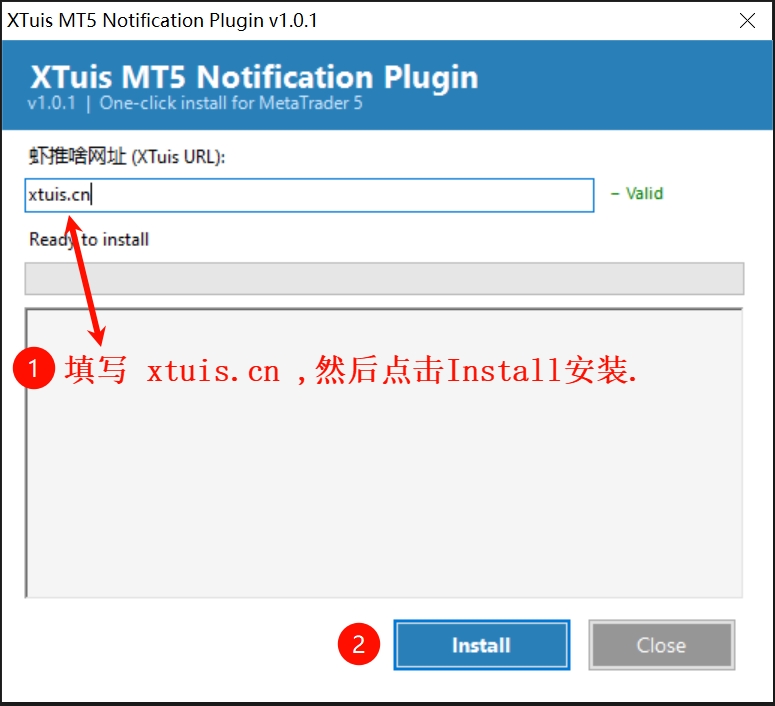
Windows x64 only (an MT5 limitation). If SmartScreen blocks the first install, click "More info → Run anyway".
Install at a glance: extract → run the exe → enter the Xtuis address → installed into MT5

If Xtuis has helped you
and you'd like to say thanks, there are two ways.
Tap a WeChat notification to open the message details in our mini program.
Seeing or tapping the ad at the bottom of that page supports us too.
If you'd like to say it more directly, scan the tip code above.
It isn't a paywall or a top-up,
just a small link between you and us.
💡 Whether or not you open the details or leave a tip, the service runs just the same.
Your support simply gives us more drive
to keep delivering your messages, late at night included.
Xtuis is a service that lets you push a notification to your phone with one line of code: a single HTTP request.
Ordinary over-limit use (daily or per-minute quota) only returns HTTP 429 or pauses sending for the day; it does not lock your account. Only sustained malicious bursts can. A locked account unlocks automatically once you pay on the unlock page, opened in WeChat.
Open https://xtuis.cn/unlock/ in WeChat. It recognises your WeChat account and unlocks it as soon as payment completes. Still stuck? Email weixin@xtuis.cn.
Opened in WeChat. Fill your token into the examples below with one tap (masked by default).